> ## Documentation Index
> Fetch the complete documentation index at: https://kasava.dev/docs/llms.txt
> Use this file to discover all available pages before exploring further.
# Demo Mode
> Explore Kasava features with sample data before connecting your repositories
Demo Mode lets you explore all of Kasava's features using pre-populated sample data. It's the perfect way to understand what Kasava can do before connecting your own repositories.
Demo Mode is great for onboarding team members. Have them explore in Demo Mode first to understand the interface before connecting real projects.
## What is Demo Mode?
Demo Mode provides a complete, interactive experience with a sample e-commerce platform called **ShopFlow**. This fictional project demonstrates all of Kasava's capabilities with realistic data.
In Demo Mode, all data is read-only. You can explore and interact with the interface, but changes won't be saved. This prevents accidental modifications to sample data.
## Enabling Demo Mode
### Sidebar Toggle
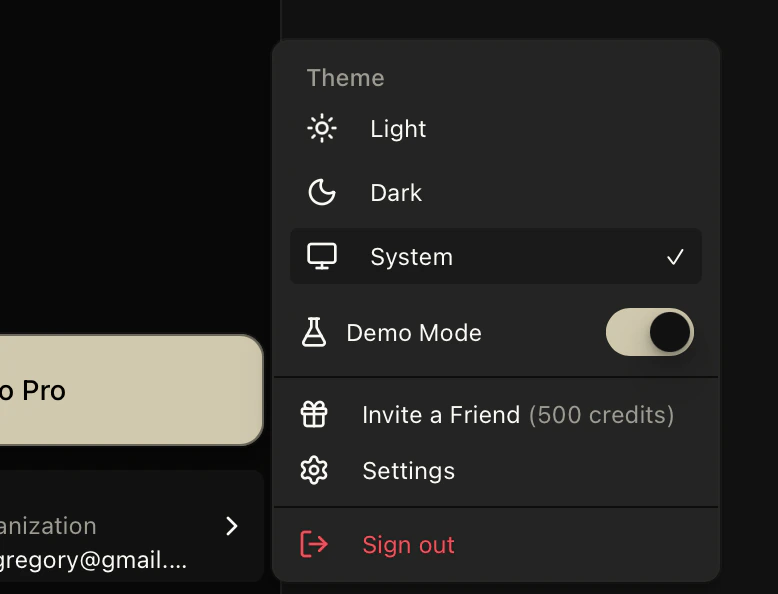
You can toggle Demo Mode on or off at any time using the switch in the sidebar:
Look for the **Demo Mode** toggle at the bottom of the sidebar, near your user profile
Click the switch to turn Demo Mode on (shows sample data) or off (shows your real data)
 ## Frequently Asked Questions
Yes! You can toggle Demo Mode on or off at any time using the switch at the bottom of the sidebar. This lets you revisit the sample ShopFlow project whenever you want to explore features or show Kasava to teammates.
No, demo data is rendered client-side for each user session. Your interactions in Demo Mode don't affect other users.
Demo Mode is read-only to preserve the sample data experience. All changes are simulated and not persisted.
ShopFlow is a fictional e-commerce platform used as sample data in Demo Mode. It represents a realistic software project with repositories, issues, PRDs, and integrations to showcase Kasava's capabilities.
## Frequently Asked Questions
Yes! You can toggle Demo Mode on or off at any time using the switch at the bottom of the sidebar. This lets you revisit the sample ShopFlow project whenever you want to explore features or show Kasava to teammates.
No, demo data is rendered client-side for each user session. Your interactions in Demo Mode don't affect other users.
Demo Mode is read-only to preserve the sample data experience. All changes are simulated and not persisted.
ShopFlow is a fictional e-commerce platform used as sample data in Demo Mode. It represents a realistic software project with repositories, issues, PRDs, and integrations to showcase Kasava's capabilities.