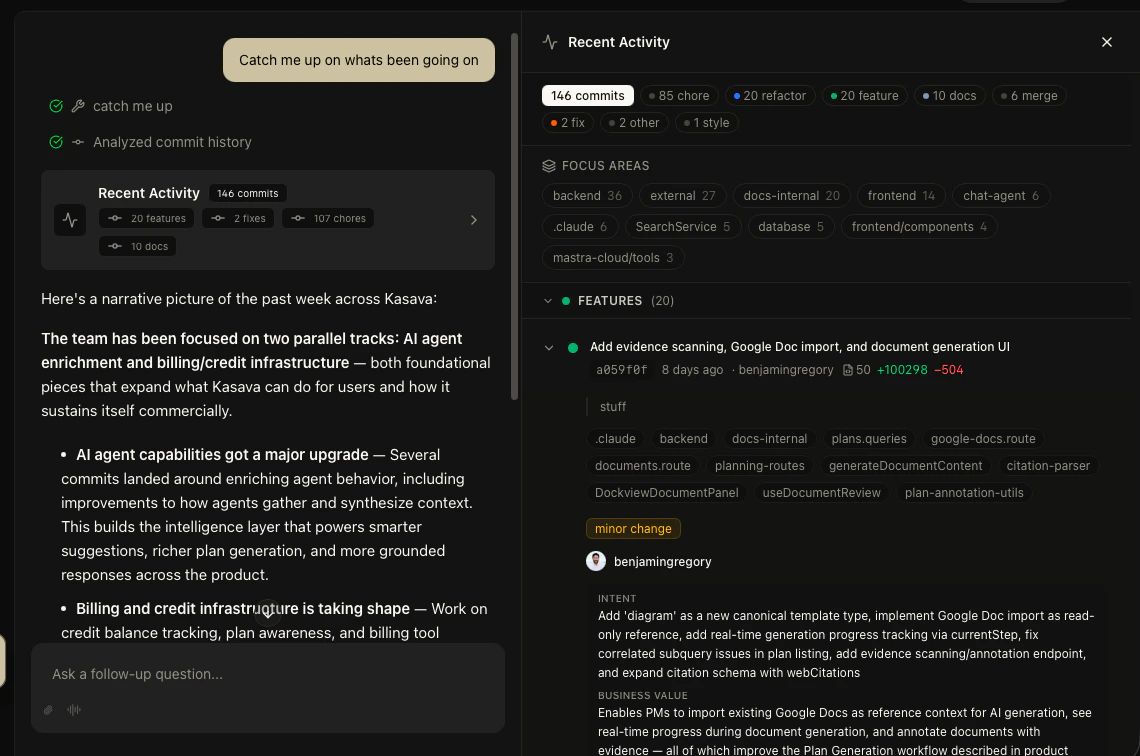
Coming back from a long weekend, switching between projects, or just starting your day? Ask the Agent to catch you up and get a structured digest of everything that changed — commits, PRs, issues, and product activity — without reading through notifications.
What You Get
The Agent returns an interactive Catch Me Up card that pulls from every connected integration and groups activity into sections — only the sections with new activity appear:
- Alerts — urgent issues (Linear P0/P1, Jira blocker/critical, critical churn signals)
- Customer Signals — Intercom, Gong, Zendesk, Fathom, Fireflies feedback
- Work & Issues — Linear / Jira / Asana / Trello tasks
- Discussion — comments on Linear issues, Asana tasks, Trello cards, Confluence pages, Google Docs, and GitHub PRs/issues
- Calls — Gong calls with extracted insights
- Code Activity — commits and pull requests
- Bug Reports — fix commits + bug-titled issues
- Documentation — Notion / Confluence page edits, Google Docs activity, internal Kasava specs/plans
- Product Decisions — plan changes, document edits, system actions
- Team Activity — top contributors with their activity mix
- Competitive — competitor scraping updates
- Sprint Health — active sprint pace + anomaly counts
Each section is gated on what your organization has connected — Notion sections only appear if Notion is wired up, Trello sections only if Trello is, and so on. Each item links back to the source, and comments/docs include a one-line excerpt.
Example Prompts
Detail Panel
Click any item in the digest to open a detail panel with full context — commit diffs, issue threads, or document changes — without leaving the chat.
Why It Matters
Save 15–30 minutes every morning. Instead of scanning Slack, email, GitHub notifications, and Linear separately, get one unified view of what matters. The Agent filters noise and surfaces what’s actually significant.
Combine with sprint insights for a complete picture: “Catch me up and how’s the sprint looking?”